Frequently Asked Questions

What is The Stories Book about?

This exquisite compilation showcases a diverse array of photographs that capture the essence of different eras and cultures, reflecting the unique styles and perspectives of each artist.

How much does The Stories Book cost?

This exquisite compilation showcases a diverse array of photographs that capture the essence of different eras and cultures, reflecting the unique styles and perspectives of each artist.

When will The Stories Book be released?

This exquisite compilation showcases a diverse array of photographs that capture the essence of different eras and cultures, reflecting the unique styles and perspectives of each artist.

Are signed copies available?

This exquisite compilation showcases a diverse array of photographs that capture the essence of different eras and cultures, reflecting the unique styles and perspectives of each artist.

=== Disable Gutenberg === Plugin Name: Disable Gutenberg Plugin URI: https://perishablepress.com/disable-gutenberg/ Description: Disables Gutenberg Block Editor and restores the Classic Editor and original Edit Post screen. Provides options to enable on specific post types, user roles, and more. Tags: classic editor, block editor, editor, gutenberg Author: Jeff Starr Author URI: https://plugin-planet.com/ Donate link: https://monzillamedia.com/donate.html Contributors: specialk Requires at least: 4.9 Tested up to: 6.8 Stable tag: 3.2.3 Version: 3.2.3 Requires PHP: 5.6.20 Text Domain: disable-gutenberg Domain Path: /languages License: GPL v2 or later Disable Gutenberg Block Editor and restore the Classic Editor and original Edit Post screen (TinyMCE, meta boxes, etc.). == Description == This plugin disables the new Gutenberg Editor (aka Block Editor) and replaces it with the Classic Editor. You can disable Gutenberg completely, or selectively disable for posts, pages, roles, post types, and theme templates. Plus you can hide the Gutenberg nag, menu item, and more! > The all-in-one, COMPLETE solution for handling Gutenberg. > Hide ALL traces of Gutenberg and replace with Classic Editor. > Restores original Edit Post screen (TinyMCE, meta boxes, etc.). The Disable Gutenberg plugin restores the classic (original) WordPress editor and the "Edit Post" screen. So you can continue using plugins and theme functions that extend the Classic Editor. Supports awesome features like Meta Boxes, Quicktags, Custom Fields, and everything else the Classic Editor can do. > Does not "expire" in 2022! :) **Easy to Use** Just activate and done! The default plugin settings are configured to hide all traces of the Gutenberg Block Editor, and fully restore the original Classic Editor. Further options for customizing when/where Gutenberg is enabled are available in the plugin settings. > NEW! Disable Block Widgets and restore Classic Widgets :) **Options** * Disable Gutenberg completely (all post types) * Disable Gutenberg for any post type * Disable Gutenberg for any user role * Disable Gutenberg for any theme template * Disable Gutenberg for any post/page IDs * Disable Gutenberg admin notice (nag) * Option to restore Classic Widgets * Option to hide the plugin menu item * Option to hide the Gutenberg plugin menu item (settings link) * Adds "Classic Editor" link to each post on the Posts screen * Adds item to the WP sidebar menu: "Add New (Classic)" * Option to enable Custom Fields Meta Box for ACF * Choose which editor to use for each post * Whitelist any post title, slug, or ID * Option to enable/disable frontend Gutenberg stylesheet > Works same as Classic Editor plugin, but can do a LOT more! > Lightweight and super fast, built with WP APIs :) Fully configurable, enable or disable Gutenberg and restore the Classic Editor wherever is necessary. _Automatically replaces Gutenberg with the Classic Editor._ **Features** * Super simple * Clean, secure code * Built with the WordPress API * Lightweight, fast and flexible * Regularly updated and "future proof" * Works great with other WordPress plugins * Plugin options configurable via settings screen * Focused on flexibility, performance, and security * One-click restore plugin default options * Translation ready > Works great with Google AMP and the WordPress [AMP plugin](https://wordpress.org/plugins/amp/). Disable Gutenberg is developed and maintained by [Jeff Starr](https://x.com/perishable), 15-year [WordPress developer](https://plugin-planet.com/) and [book author](https://books.perishablepress.com/). _Super light & fast plugin, super easy on server resources!_ **Why?** Gutenberg is a useful editor but sometimes you want to disable it for specific posts, pages, user roles, post types, and/or theme templates. This plugin enables you to disable Gutenberg and replace it with the Classic Editor wherever you want. For example, lots of WordPress users already enjoy robust page-building functionality via one of the many great plugins like Composer or Elementor. So many options, no need to feel "locked in" to using Gutenberg! _If you like Disable Gutenberg, please give it a [5-star rating](https://wordpress.org/support/plugin/disable-gutenberg/reviews/?rate=5#new-post), thank you!_ **Privacy** This plugin does not collect or store any user data. It does not set any cookies, and it does not connect to any third-party locations. Thus, this plugin does not affect user privacy in any way. **Support development** I develop and maintain this free plugin with love for the WordPress community. To show support, you can [make a donation](https://monzillamedia.com/donate.html) or purchase one of my books: * [The Tao of WordPress](https://wp-tao.com/) * [Digging into WordPress](https://digwp.com/) * [.htaccess made easy](https://htaccessbook.com/) * [WordPress Themes In Depth](https://wp-tao.com/wordpress-themes-book/) * [Wizard's SQL Recipes for WordPress](https://books.perishablepress.com/downloads/wizards-collection-sql-recipes-wordpress/) And/or purchase one of my premium WordPress plugins: * [BBQ Pro](https://plugin-planet.com/bbq-pro/) - Super fast WordPress firewall * [Blackhole Pro](https://plugin-planet.com/blackhole-pro/) - Automatically block bad bots * [Banhammer Pro](https://plugin-planet.com/banhammer-pro/) - Monitor traffic and ban the bad guys * [GA Google Analytics Pro](https://plugin-planet.com/ga-google-analytics-pro/) - Connect WordPress to Google Analytics * [Head Meta Pro](https://plugin-planet.com/head-meta-pro/) - Ultimate Meta Tags for WordPress * [Simple Ajax Chat Pro](https://plugin-planet.com/simple-ajax-chat-pro/) - Unlimited chat rooms * [USP Pro](https://plugin-planet.com/usp-pro/) - Unlimited front-end forms Links, tweets and likes also appreciated. Thanks! :) == Screenshots == 1. Plugin Settings screen (showing default options) 2. Plugin Settings screen (showing expanded options) == Installation == **Installing the plugin** 1. Upload the plugin to your blog and activate 2. Configure the plugin settings as desired 3. Enable theme switcher via settings or shortcode [More info on installing WP plugins](https://wordpress.org/support/article/managing-plugins/#installing-plugins) **Settings** Out of the box, Disable Gutenberg makes your WordPress 100% Gutenberg-free. If you visit the settings page, you will see that the "Complete Disable" option is enabled, and so is the "Disable Nag" option. This is all that is required to disable Gutenberg (and the nag) sitewide. Now, if you want to customize things and, say, only disable Gutenberg on specific post types, you can uncheck that first "Complete Disable" option. When you uncheck the box, more options will be displayed. So you can choose exactly where Gutenberg should be disabled. **Whitelist** In some cases, you may want to disable Gutenberg everywhere, but enable only on certain posts. To do this, set the "Complete Disable" option to __enabled__. Then visit the "Whitelist" settings to specify which posts always should open in the Block Editor. **Important** Do not use Disable Gutenberg with other plugins (like the Classic Editor plugin) that also disable or replace Gutenberg. Why? Because it may cause loading of redundant scripts, which may in turn lead to unexpected/untested results. **Hide Menu Option** Disable Gutenberg provides a setting to disable the plugin's menu item. This is useful if you don't want your clients to get curious and start fiddling around. If you enable the option to hide the plugin's menu item, you will need to access the plugin settings page directly. It is located at: `/wp-admin/options-general.php?page=disable-gutenberg` So if WordPress is installed at this URL: `https://example.com/` ..then you would access the plugin settings at: `https://example.com/wp-admin/options-general.php?page=disable-gutenberg` Or, if WordPress is installed in a subdirectory, for example: `https://example.com/wordpress/` ..then you would access the plugin settings at: `https://example.com/wordpress/wp-admin/options-general.php?page=disable-gutenberg` So if you hide the plugin's menu item, you always can access the settings directly. **More Tools** The settings include a "More Tools" link. Clicking it toggles open some advanced options: * Classic Widgets - Restores Classic Widgets * Disable Nag - Disables "Try Gutenberg" nag * Enable Frontend - Enables frontend block stylesheet * Whitelist Options - Displays the whitelist settings * Plugin Menu Item - Hides the Disable Gutenberg menu item * Gutenberg Menu Item - Hides the Gutenberg plugin menu item (for WP less than 5.0) * Display Edit Links - Displays "Add New (Classic)" menu links and Classic/Block edit links * ACF Support - Enables the Custom Fields Meta Box (ACF plugin disables by default) * Reset Options - Restores the default plugin options If there are any questions about these items or anything else, feel free to [contact me directly](https://plugin-planet.com/support/#contact) or post in the [WP Support Forums](https://wordpress.org/support/plugin/disable-gutenberg/). **Uninstalling** This plugin cleans up after itself. All plugin settings will be removed from your database when the plugin is uninstalled via the Plugins screen. **Going Further** For developers wanting to customize further, check out: * [How to Disable Gutenberg: Complete Guide](https://digwp.com/2018/04/how-to-disable-gutenberg/) * [How to Selectively Enable Gutenberg Block Editor](https://digwp.com/2018/12/enable-gutenberg-block-editor/) **Show Support** I strive to make this free plugin the very best possible. To show support, please take a moment to leave a [5-star review](https://wordpress.org/support/plugin/disable-gutenberg/reviews/?rate=5#new-post) at WordPress.org. Your generous feedback helps to further growth and development of Disable Gutenberg. Thank you! == Upgrade Notice == To upgrade this plugin, remove the old version and replace with the new version. Or just click "Update" from the Plugins screen and let WordPress do it for you automatically. Note: uninstalling the plugin from the WP Plugins screen results in the removal of all settings and data from the WP database. == Frequently Asked Questions == **Will this work without Gutenberg?** Yes. When Gutenberg is active, the plugin disables it (depending on your selected options) and replaces with the Classic Editor. Otherwise, if Gutenberg is not active, the plugin does nothing. So it's totally fine to install before Gutenberg is added to WP core, so it will be ready when the time comes. **What's the difference between Classic Editor plugin?** Classic Editor plugin enables you to disable Gutenberg across the board, and replace it with the Classic Editor. The Disable Gutenberg plugin does the exact same thing, in the exact same way, BUT it also provides more granular control over when and where Gutenberg is replaced with the Classic Editor. Disable Gutenberg plugin makes it easy to replace Gutenberg everywhere, OR you can choose to replace only for specific post types, user roles, post IDs, theme template, and more. Check out the list of features and compare them to the alternatives. It's not even close! ;) Bottom line: both Disable Gutenberg and Classic Editor plugins are lightweight and enable you to replace Gutenberg with the Classic Editor for the entire site. The difference is that Disable Gutenberg also gives you advanced configuration options including menu hiding and more. **Can I activate Disable Gutenberg without Gutenberg?** Yes, you can install and activate Disable Gutenberg on any supported WordPress version (see Docs/readme.txt for details). If installed on WP versions less than 5.0 without the Gutenberg plugin active, the Disable Gutenberg plugin simply won't do anything (but you can still configure settings, etc.). **Can I use this plugin and Classic Editor at the same time?** Yes, if both plugins are active at the same time, Disable Gutenberg gives priority to Classic Editor plugin. So if you want to use Disable Gutenberg, deactivate the Classic Editor plugin (you do not have to remove it, just deactivate via the Plugins screen). **Classic Editor planned to expire in 2022, what about Disable Gutenberg?** I can't make any promises, but I intend to develop with WordPress for the long-haul. Who knows what the future holds, but the plan is to keep Disable Gutenberg going for many years to come. Why? Because the original RTE/Visual Editor is awesome. I strongly feel it's one of the many reasons why WordPress has enjoyed its great success. I've been using the original/classic editor for over 10 years now and it's always been 100% smooth experience. I've tried Gutenberg, and yes it is much better now than in previous versions, but for me it's just not as comfortable or streamlined as the classic editor. So yeah, will do everything possible to keep Disable Gutenberg (and the Classic Editor) going well beyond 2022. **Why does Classic Editor plugin have way more users?** Because it is being promoted by the Gutenberg developers and the "official" plugin for replacing Gutenberg. That's fine, but understand that Disable Gutenberg functions the same way AND provides way more features and settings. FWIW, I use Disable Gutenberg on my own sites Perishable Press, DigWP.com, Plugin Planet, and many others. 100% solid. **Template exclusions not working?** In order for template exclusions to work, the template must be registered with the page itself. The only way to do this is via the "Edit Page" screen, in the "Page Attributes" meta box. There you will find an option to set the page template. Remember to save your changes. After assigning some templates, they will be recognized by Disable Gutenberg. So to disable Gutenberg on any registered template, you can add them via the plugin setting, "Disable for Templates". Examples: * Template name is `page-custom.php`, located in the root theme directory: enter `page-custom.php` in the Template Exclusion setting * Template name is `page-custom.php`, located in a subdirectory named `templates`: enter `templates/page-custom.php` **The shortcut links are mixed up?** In previous versions the default was to show the Gutenberg Editor links. In 1.5.2, the default is to hide the extra editor links. So what I'm guessing happened in this case is that you had a previous version of DG and changed some settings. When you did that, it set the "show edit links" option to the then default, which is enabled. So now that you have upgraded, that saved "enabled" option still applies. Now to fix, you can do one of two things: - Visit the More Tools and disable the option to "Display Edit Links" - Or simply click to Restore the default plugin settings Either route will get you there. **How to disable default Gutenberg frontend styles?** The default Gutenberg/Block styles are disabled by default when DG plugin is active. To enable/disable the styles, visit the plugin setting, "Enable Frontend". **Does this work with full site editing and block themes?** No, because block themes rely on blocks. [See Block themes article](https://wordpress.org/support/article/block-themes/) for more information. **Got a question?** Send any questions or feedback via my [contact form](https://plugin-planet.com/support/#contact) == Changelog == Thank you to everyone for using Disable Gutenberg and for all the [awesome 5-star reviews](https://wordpress.org/support/plugin/disable-gutenberg/reviews/)! If you have any feedback or suggestions to make this plugin the absolute best it can be, and/or would like to help with development, please reach me via the [contact form](https://plugin-planet.com/support/#contact) at Plugin Planet. **3.2.3 (2025/03/24)** * Removes `load_i18n()` function * Adds uninstall option `disable-gutenberg-dismiss-notice` * Generates new language template * Tests on WordPress 6.8 Full changelog @ [https://plugin-planet.com/wp/changelog/disable-gutenberg.txt](https://plugin-planet.com/wp/changelog/disable-gutenberg.txt) 产品 – The higher Quality of Skincare Products In Asia

.

Cleansing Gel   功能 :

適合油性、中性肌膚,清爽不殘留,避免毛孔阻塞,易清洗,更加潔凈,使肌膚潔凈,舒爽不緊繃

Skin Type : Oily , Normal

.

Cleansing Milk   功能 :

特製無泡沫奶狀潔臉露,超級濃縮,專為幹性皮膚所配製,具有滋潤,保濕的強大功能,洗後皮膚頓覺清涼舒爽,適合各種肌膚,溫和不刺激,清爽不殘留;具有卸妝和清潔臉部肌膚的雙重功效

Skin Type : 所有皮膚

.

Hydrating Toner   功能 :

首創特製精華液狀,非水壯,專為幹性皮膚所配製,具有滋潤,保濕,潔膚 3 in 1 的強大功能,清涼舒爽又柔和

Skin Type : 所有皮膚

.

Nutrient Toner   功能 :

保濕因子高,舒緩鎮定,抗敏感,能給予水分,肌膚活力,促進肌膚柔嫩,一般肌膚使用

Skin Type : 幹性 ,老化

.

Anti Allergy Essence   功能 :

能鎮定,舒緩,脆弱敏感肌膚,有效幫助敏感性肌膚對抗外的侵害,舒緩和減少脆弱敏感肌膚不適感,保濕,消紅效果

Skin Type :敏感性質皮膚

.

Bio kinetin   功能 :

類胎盤素(植物性及保濕成份,具有活性成分,可以修復皮膚細胞,能改善幹燥,粗糙,脫水肌膚,減少細紋的產生,延緩肌膚老化現象,賦予肌膚彈性與活力,緊致調理肌膚,使肌膚明亮光滑,白皙

Skin Type : 幹性 , 老化

.

HA + Placenta 2 in 1   功能 :

含有胎盤素,玻尿酸保濕成份,雙重保濕,滋養修復肌膚,補充水份,加強肌膚保濕度,能延緩肌膚老化,緊致肌膚,改善幹燥現象

Skin Type : 幹性 , 老化

.

Hyaluronic Acid Esse   功能 :

玻尿酸原液,分子细小,容易深入肌肤,提供长效性的保湿作用,防止水分流失,提高肌肤保水度,使肌肤水嫩有光泽.

Skin Type : 所有性質皮膚

.

Lighteninig Serum   功能 :

含有熊果素,能迅速滲入肌膚,有效抑製酪酸酶的活性,減少黑色素形成,淡化斑點,色素,改善色素沈澱現象。增加肌膚明亮度,使肌膚更加均勻嫩白

Skin Type : 長斑性質皮膚

.

Nano Petipe   功能 :

柔軟細致的質地能讓肌膚快速吸收,使細小的保養分子快速深入肌膚,修補肌膚,撫平細紋平滑肌膚,重現肌膚年輕光采

Skin Type : 幹性 , 老化

.

X ' Moisture   功能 :

對抗老化肌膚使用,用後能使肌膚回復柔須平滑的線條,富含預防衰老復合物的燕麥仁萃取能防止老化,淡化細紋,加強保濕,補充水份,對於老化幹燥紋路之肌膚,能達到延緩老化,緊致之效果

Skin Type : 松弛 , 老化

.

Hydrating Serum   功能 :

鎖水,保濕,補水,可抗敏,修復肌膚,可改善表皮脫水粗糙現象,使肌膚柔嫩平滑,更加飽滿健康

Skin Type : 所有性質皮膚

.

Ice Soothing Serum   功能 :

具有舒緩,鎮定,消紅,退腫,柔肌,並能滲入調理,修護肌膚,增強保水功能,深層保濕,減少脆弱敏感肌的不適感,有效解除肌膚因幹燥引起幹癢不適之精華液。

Skin Type : 敏感性質皮膚

.

Bio Regenerating   功能 :

含高濃度保濕,滋潤精華,能喚醒深層能量提升肌膚彈性,活力與緊致柔滑膚觸,淡化細紋,拉提,延緩肌膚皺紋,消除老化

Skin Type : 幹性 , 老化

.

Nano Collagen Serum   功能 :

濃度六勝肽及玻尿酸成份,能緊致調理肌膚,撫平細紋、粗大毛孔、補充肌膚水份,平滑肌膚,使肌膚光滑肉嫩,加強賦予肌膚彈性與活力,使皮膚更加年輕水嫩飽滿,展現容光煥發的好膚質。
Skin Type : 幹性 , 老化

.

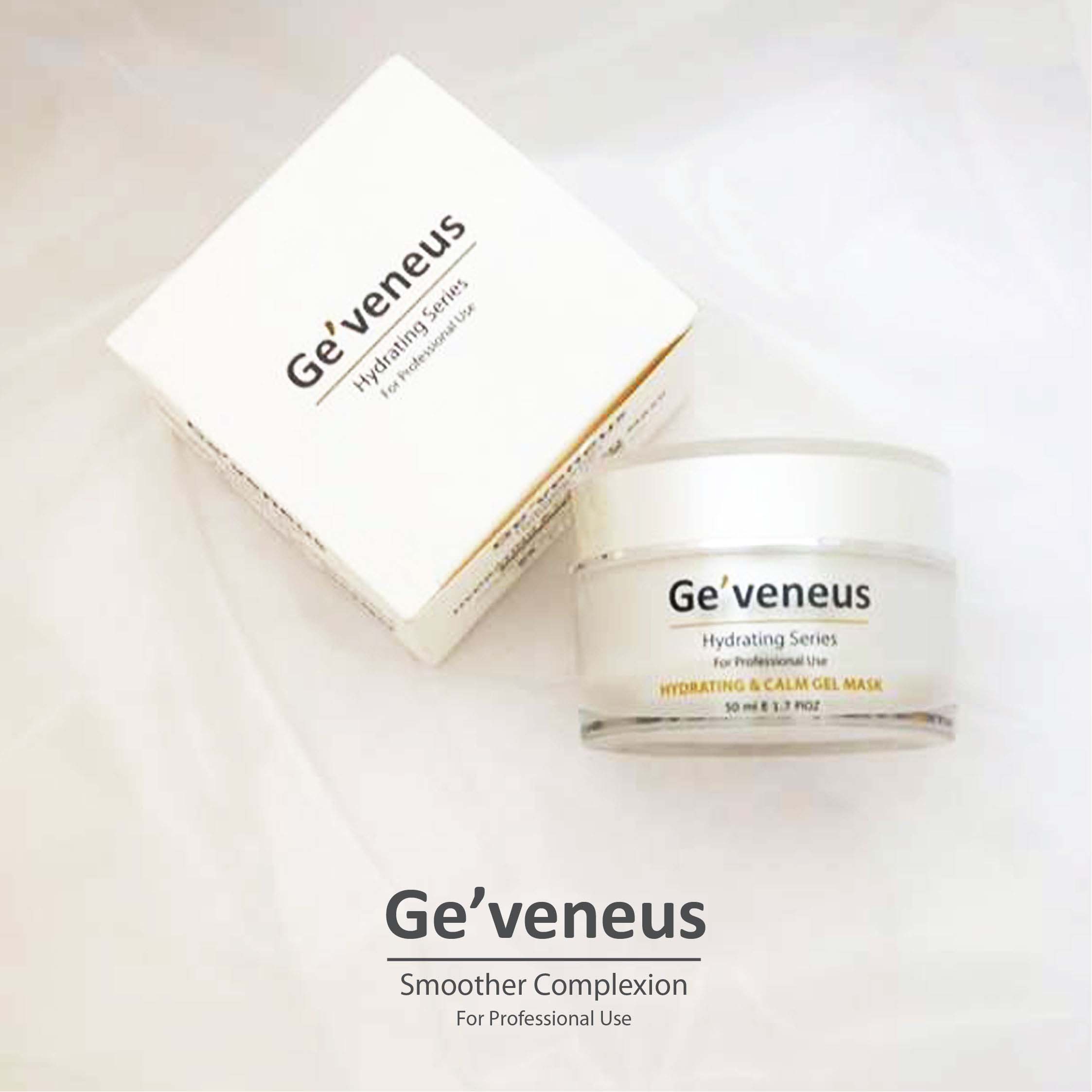
Calm Gel Mask   功能 :

含有豐富微量元素的吉拉索蘆薈,使用後清爽不油膩,有效舒緩肌膚,減緩肌膚泛紅情形,迅速補充肌膚水份,減少外界對肌膚的刺激,清涼保濕之滋潤膠,同時並可用於夜間之凍膜。作為補水面霜使用只需塗上薄薄的一層保濕凝膠及可,而作為保濕面膜使用就需要塗上較厚的保濕凝膠

Skin Type : 油性 , 中性

.

Everlasting Cream   功能 :

去除皺紋 , 刺激膠原蛋白增生 , 結實肌膚 ,同時具有滋潤與保濕效果

Skin Type : 老化,下垂

.

Moderation Cream   功能 :

溫和滋養肌膚,並舒緩、柔潤強化皮膚天然屏障,使肌膚所水分不流失,緩和肌膚不適及粗幹現象,讓肌膚加強防護 展現柔嫩與光采。適合所有膚質,特別是敏感性肌膚使用

Skin Type : 敏感性質皮膚

.

Q 10   功能 :

六勝肽能有效緊致肌膚,撫平細紋及粗大毛孔,可滋潤保濕肌膚,改善幹燥粗糙現象,提升肌膚彈性,細紋柔滑

Skin Type : 幹性皮膚

.

Water Cream   功能 :

清爽不黏貼之水凝劑型,可長效保濕, 舒緩,鎮定因幹燥引起的不適現象,改善調理問題肌膚,有效賦活緊致肌膚,使皮膚恢復彈性與活力

Skin Type : 油性皮膚

.

Whitening Lotion   功能 :

多科植物萃取物,清爽不油膩配方,分子小好吸收,可有添加保濕嫩白,改善暗沈,無光,色素不均勻的現象,使肌膚柔滑細致,活力光采

Skin Type : 色素不均匀

.

Water Restoring   功能 :

保濕 + 滋潤,平衡水分,修補暗沈,改善皺紋

Skin Type : 幹性 , 老化

.

9 GF   功能 :

多科植物萃取物,清爽不油膩配方,分子小好吸收,可有添加保濕嫩白,改善暗沈,無光,色素不均勻的現象,使肌膚柔滑細致,活力光采

Skin Type : 老化脱水

.

Sunblock   功能 :

防曬,隔離紫外線, 可當妝前隔離液使用。質地清爽,快速吸收不黏膩。避免陽光照射及環境汙染對皮膚的傷害之防曬霜。適合一般皮膚使用。

Skin Type : 所有性質皮膚

.

Sun Foundation   功能 :

清爽不油膩,分子細小,不阻塞毛孔,色調均勻,具有遮瑕及防嗮雙層功能,可長效保濕, 讓臉部皮膚看起來更加美觀

Skin Type : 所有性質皮膚

.

Eye Essential   功能 :

專門為保護眼部肌膚而設,具有滋潤,促進眼部皮膚細胞的血液循環和新陳代謝功能

Skin Type : 所有性質皮膚

.

Eye Wrinkles Cream   功能 :

抗老及六勝肽,能補充肌膚水份,滋潤眼角,有效減少眼部或其他皺紋產生,改善因幹燥引起的眼周暗沈,延緩眼部肌膚老化現象。讓眼部散發明亮,無暇的迷人風采

Skin Type : 幹性 , 老化

.

Oily Emollients Cream   功能 :

調節皮脂分泌,有助於打開毛孔,排出阻塞物。並可針對黑頭,粉刺之增生。

Skin Type : 油性皮膚

.

Pimple Gel   功能 :

能幫助舒緩面皰,暗瘡膚質,有效凈透毛孔,調節皮脂分泌,並可針對局部肌膚加強,軟化,改善,面皰問題,使肌膚平滑細致

Skin Type : 油性皮膚

.

Body Lotion   功能 :

采用高度細小分子和具有療效功能的成分提煉,容易滲透肌膚,具有強大滋潤和保濕功能,使肌膚長期得到適當的保養,使肌膚免於受到空氣汙染和陽光的傷害,非常有效地延緩皮膚老化,對於已經老化的皮膚,用後能使肌膚回復柔潤滑光亮。
Skin Type : 所有皮膚

.

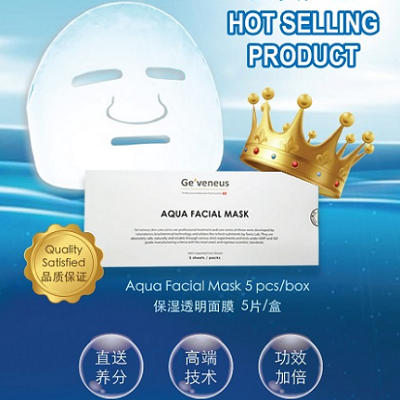
Hydrating Aqua Mask   功能 :

非一般普通面膜,100%完全透明,具有滋潤,保濕,柔化臉部皮膚功能,非常有效的消除臉部皮膚皺紋

Skin Type : 所有性質皮膚

.

Repairing Aqua Mask   功能 :

非一般普通面膜,100%完全透明,具有修復細胞 , 促進血液循環功能 功能,

Skin Type : 所有性質皮膚
The Power By :
All Of The Contents Are Copyright © Under By www.geveneus.com

www.geveneus.com


Notice: ob_end_flush(): failed to send buffer of zlib output compression (1) in /home/elsainte/geveneus.com/wp-includes/functions.php on line 5481

Notice: ob_end_flush(): failed to send buffer of zlib output compression (1) in /home/elsainte/geveneus.com/wp-includes/functions.php on line 5481